This chapter describes the use of X-POWERFIT to generate Ca traces directly from electron density maps. X-POWERFIT is designed to analyze experimental electron density maps and then provide automated methods of generating and adding Ca-trace atoms into electron density. There are three automated protocols available: one optimized for maps with high resolution (better than 2.0 Å), and the other two for low resolution (2 to 4 Å).
X-POWERFIT has been designed as a tool for crystallographers to help speed up de novo Ca tracing and model building. As in all model building, the crystallographer should carefully review the automated results for accuracy.
X-POWERFIT can be accessed from the X-AUTOFIT: X-BUILD palette as the tool X-POWERFIT. This application is designed to analyze an experimental map and trace the Ca chain in an automated or semi-automated manner. It has three different tools for automated de novo Ca tracing:
Also available are algorithms to check for internal knots in the Ca trace, refine the Ca traces, and edit the positions of the vectors (helices and strands) identified by X-POWERFIT | Find sec. struct.
The application requires an extended map that covers the entire region to be traced. The knowledge of the space group of the molecule to be built is highly recommended but not absolutely necessary.
X-POWERFIT is optimized for the use of real data that is better than 4 Å in resolution, and works best on the original MIR/SIR/MAD map. Although it is possible to use a final map to try out the application, the best results are with real, unrefined data. You can also try the X-POWERFIT tools on MIR/SIR/MAD maps that have been through density-modification. Be aware that if no information is present in the electron density map, then no information will be found by this application. The main advantage of X-POWERFIT is with large structures where the large amount of information in the map can make initial tracing difficult for a person to complete. X-POWERFIT has been used successfully to identify most of the Ca atoms in structures with 200-500 residue in 1-5 minutes.
X-POWERFIT is simple to use, as it is mostly automated, but it must be noted that it is still an expert system. It is easy to build an incorrect structure very quickly when used by a non-crystallographer. At each stage, the application should be used as a guide to modeling a crystal structure and not as a black box building application.
As an extension to the model building aim of the application, the tool for determining the secondary structure (X-POWERFIT | Find sec. struct.) is useful in determining the quality of lower resolution electron density maps. This represents an interpretative method of classifying the over- and under- connectivity of electron density maps. Hence, the quality of the map can be defined as the quantity of secondary structure that can be determined successfully by the application. Of course this may not indicate the quality of the loop regions, which are always the most difficult sections of the model to build.
For the low resolution tracing protocols (Auto-trace Low and Consensus Tracing), the starting point is not the electron density bones but either one or more manually placed Ca atoms or the secondary structure elements (helices and strands) of the molecule. The latter can be identified using the tool X-POWERFIT | Find sec. struct. This tool identifies secondary structure in the map.
Find sec. struct. is based on the calculation and placement of vectors that represent the principle components of the secondary structural elements.
Vector = principle component of helix/strand
This palette can be used to generate an initial Ca trace, which can be then extended if needed in a semi-automated manner using the CA Build palette for a Ca -tracing session.
Before you use X-POWERFIT, you must calculate and extend an electron density map so that at least one protein molecule is covered by electron density. This map should be converted into brick map format and then opened using the map handling tools. Because the automated routines determine structure in all the currently visible maps, it is recommended that the first stage in analysis be to delimit the molecule with a map mask.
To generate a map mask from an experimental map, the map must be open and the Map Management table displayed (Draw | Maps table | Show map table). The following description presents the generation of a map mask from bones, but if you have a homologous set of coordinates, these can also be used to generate the mask. The X-AUTOFIT application should be started (Applications | X-AUTOFIT), and the palettes for Bones... and Map masks... should be opened from the X-AUTOFIT control palette. Using the Options... | Map radius dialog option, set the map radius to a large value, such as 100 Å. This results in the entire map being displayed and read for analysis, but be aware that systems with less than 64 MB of real memory will be slow due to memory swapping.
All of the tracing protocols in X-POWERFIT work with the skeletonized representation (bones) of the electron density map. The bones can be edited, and turned on and off, using X-AUTOFIT | Bones.... For more details on how to generate and edit the bones, refer to Bones.
Since the algorithm is based on the analysis of the bones network it is to be expected that there is some correlation of the bones parameterization to the number of elements found in the electron density. Because the algorithm sets the Trim level and Side /main chain detect level to optimal values, the initial values of these parameters have no effect on the results. The algorithm also modifies the bones slightly, so as to create a particular density of network start points, so the presence of side chain density is not necessary. This is important for lower resolution densities where the bones can end up particularly featureless. The only parameter that can therefore affect the algorithm is the Start value of the bones. Generally, if the bones look interpretable then the algorithm will work. There is actually little detriment to the quality of the results for bones levels that are slightly small (that is, over-connected) except that the search takes longer as there are more possible connections to explore. There is major detriment to the results where the bones are significantly fragmented.
The type of map used affects the bones start value. The following numbers for the bones start value are provided as a guide only, and you should optimize the connectivity of the bones using Bones | Map quality from bones. The aim is to reduce the number of false connections without increasing the fragmentation of the map within the bounding mask. You should note that the values suggested are slightly lower that would normally be used for manual model building. This is to reduce the fragmentation of the bones which seriously affects the quality of the results produced.
Once the mask has been generated (Introduction to X-AUTOFIT/X-BUILD/X-POWERFIT (X-FIT)), it should be used as a boundary for the calculation by turning on the toggle option X-AUTOFIT | Bones| Mask bones by mask. This increases the speed of the calculation and prevents finding structure outside the volume of interest. The X-POWERFIT palette can now be used to auto trace the Ca atoms.
If the resolution of your data is between 2.0 Å and 1.2Å, you can use the new high resolution tracing protocol in X-POWERFIT. This protocol is dependent on the quality of the map. Since the tracing algorithm is extremely fast (normally within 1 second), we recommend that you try Auto-trace High with several different Bones start values (sigma levels).
Open the X-POWERFIT palette from the main control palette X-AUTOFIT: X-BUILD and select Auto-trace High.
This is a pathway analysis method and is designed to work on connected electron density-this generally occurs in maps with resolution worse than 1.2 Å. It also requires some peaks in reasonable Ca atomic positions. This generally occurs in maps with resolution better than 2.2Å. This method differs from the low resolution density tracing method in that it correlates all the possible paths at one time rather than sequentially follows a path.
The tracing method looks for all the possible 3.8 Å batons within the map, then does a correlated analysis to work out the ideal path from all the possible batons found from the bones.
The bones path is generated from the masked out region of electron density. Branched points are identified (In the figure below, points labeled a are probably Ca atoms; points labeled b are possibly Ca atoms).

The presence of Glycines or poor density can result in featureless regions in the bones representation. For such regions, the depth analysis of the bones looks for sections longer than 5 Å, and divides these up into the best integer number of 3.8 lengths (point c in the figure above).
At this stage, multiple Ca-Ca batons are created using a depth search from each branched bones point to find neighboring branches. The variance allowed in the baton length is 3.0 Å - 4.8 Å.
The resulting batons are clustered to remove degeneracy (multiple inter-connected branch-points). Adjacent batons are merged to generate fragment chains, with a length restraint of 3.0 Å - 5.0 Å, and an angle restraint (opening angle) of > 75°. Fragments with a single gap of between 3.0 Å and 4.8 Å are closed to form a single continuous fragment.
The fragment analysis is based on the assumption that the most likely trace in the electron density is the longest trace. The algorithm starts with the longest trace and deletes all fragments that overlap with the trace. The result is a unique set of non-overlapping fragments.
The final step is conversion of the best set of fragment chains into a Ca trace. Ca refinement should be run on the resultant Ca trace because of the errors that can result within the pseudo bond lengths.
Before using the automated low resolution tracing tools (Auto-trace Low or Consensus tracing), one of the following steps must be performed:
One way of starting a low resolution tracing experiment is by determining the secondary structure from the map. The calculation uses the bones information so the bones should be turned on. Specify a map radius large enough to completely fill the bounding mask, with bones trimmed beyond the mask. Turn off the mask display, as it is not necessary to view the mask, and it reduces the performance of the graphics.
Open the X-POWERFIT palette from the main control palette X-AUTOFIT: X-BUILD and select X-POWERFIT | Find sec struct. Depending on the volume of the asymmetric unit this will take some minutes to calculate, normally about two minutes for a protein < 200 residue, and maybe up to 30 minutes for an 800-residue protein. The progress of the calculation can be observed on the message line and the molecular display. Upon completion of the calculation the display should have a number of vectors in color 5 and color 14 (normally white and pink, respectively). The color 5 vectors represent possible helices and the color 14 vectors represent possible strands.
The process of determining the secondary structure is carried out in several stages. On picking the Find sec struct tool, the bones display is hidden to improve the speed of redrawing of the screen. Maps and masks are not automatically hidden by the tool and you are recommended to make them invisible before using this tool. To abort the search during the pattern recognition, click the left mouse button. All the following steps are carried out with no intervention by you, unless aborted by a mouse click.
The first part is a 13-stage pattern recognition step where every part of the bones network is analyzed for parts that look like a helix or strand. The program attempts to determine the longest piece of secondary structure that will fit before the pattern of the secondary structure breaks down. The smallest piece of secondary structure that can be found by the algorithm is 2.5 turns of helix, and a four residue strand. The longest section of secondary structure that can be determined is 50 Å long. This phase of the analysis is observed as a series of color 5 and color 14 lines appearing on the screen. The lines adapt and merge as the algorithm continually modifies the results during the analysis.
The progression of this part of the calculation is indicated on the message line at bottom of the molecular view. The program indicates that it is searching the map and shows the progress as the proportion of the total number of bones networks to be searched
Pattern recognition Done/To do 256/433
In this example there are 433 networks to search for this map, 256 have been searched. As a guide, this example took 70 seconds to carry out the 433-network search.
The next stage of the search is to cluster the resulting solutions.
The multiple solutions found are combined by cluster analysis to reduce the time taken in the next steps. For smaller structures (less than 300 residues), the time taken for the clustering is not very long, normally on the order of seconds, but for large structures of more than 500 residues, the clustering can take minutes. The prompt will change during the clustering process:
Clustering 244
The number reduces in size, initially very quickly, and more slowly as the problem becomes more difficult to solve. For the example here, the clustering took two seconds. For a much larger protein of 750 residues the clustering took about five minutes.
The next stage of the analysis is the determination of sheet structure from the strands found by the search. This is instantaneous and weights the probability of the strands towards the generation of supersecondary structure within the map.
The next stage of the analysis is to carry out directed refinement of fragments of Ca-trace into the electron density at each of the proposed sites. The detail of the directed refinement is described under the tool heading Vector -> Ca trace. The application attempts to refine a secondary structure element into the electron density, and then determine a weighted fit of the element at the final site of refinement. The weighted fit is then used to screen out elements unlikely to be real structure, which are therefore deleted from further analysis. The refinement takes approximately 0.2 seconds/element. The progress of this part of the calculation is indicated on the message line by the comment:
Refining Error : 45/70 = 0.210
This prompt indicates that the 45th structural element of 70 to refine has a residual from refinement of 0.210. If the residual is below 2.0, the element is accepted as a possible secondary structural element. The units for the residuals are undefined, as they are a weighted fit of modified atoms to electron density as a function of their position in the secondary structural element.
The application also writes out to the textport when it has found a likely helix/strand when the residual is below 2.0 so that you can at least observe if some success is likely during the calculation. For the example with 70 elements to refine, the time taken was 12 seconds.
The next stage is an overlap analysis. The secondary structural elements are weighted by the directed refinement algorithm as the likelihood of fitting at a search position. The tool checks to see if the remaining elements overlap since secondary structure cannot physically overlap within a protein. (Some overlap is allowed at the ends of elements so that bent helices can join together.) This analysis is very rapid and is normally less than 1 second as the number of remaining elements is very small. The message line shows:
Deleting overlaps 15
The number indicates the number of remaining secondary structure elements during the analysis of overlaps. In this example the time taken was less than one second to carry out the overlap analysis, and the final number of secondary structural elements was 10.
Number of vectors = 10
X-POWERFIT describes the results as vectors, since the secondary structure at this stage is only presented as single lines representing the principle components of the secondary structure. This reduced representation is to prevent too much information being displayed on the screen as the result of the analysis.
On completion of the calculation the vectors that represent the principle components of secondary structure are shown using lines in color 5 (helices) and color 14 (strand) with a line thickness of 5 units. These default values can be changed using the Color table... dialog box.
The bones display reappears if initially visible before the calculation. By default, the bones are not permanently modified by the calculation (the extra points are removed). However, you may want the bones to be modified by the calculation to improve the search analysis. If so, a subsequent use of Find sec. struct. gives slightly different results as further modification is made. This feature is included as an option because it allows subsequent searches to give different results, which can be advantageous with difficult problems.
The second way of starting a low resolution tracing experiment is by placing one or a few Ca atoms manually using the bones atoms as a guide. For this, use the tools X-AUTOFIT:X-BUILD | CA-build | Next CA or X-AUTOFIT:X-BUILD | CA-build | Add helix or strand.
Once the secondary structure elements have been identified, or a few Ca atoms have been placed manually, you can automatically generate a full Ca trace for the molecule using X-POWERFIT | Auto-trace Low. This protocol is uniquely suited for low resolution structures (between 4 and 2.0 Å). The number of Ca atoms placed by this tool and the precision of the atom placement depends on the quality of the map, but even with poor maps (FOM  0.5), the algorithm can provide a significant saving in time over conventional methods of interpretation. The protocol is also strongly dependent on the bones sigma and trim values (as given by the Bones Start values).
The algorithm uses a sequential trace method; that is, it places one Ca atom at a time based on the position of previously placed Ca atoms.
The starting point for automated low resolution tracing is either the placed vectors or the Ca atoms. If vectors are used, these are converted to a Ca trace by rigid body refinement.
The vectors have an associated weight defined by the fit to density for this vector trace, so the multiple secondary structure vectors are ordered by fit to density. The tracing therefore starts at the best secondary structure vector.
On failure of fitting a chain, the Auto-trace Low button tries the next secondary structure element (unless it has already been fitted by a previous tracing attempt).
The pathways within the electron-density map are defined by analysis of bones ridgelines starting from the bones seed point (Figure 1., blue circle). The bones are analyzed to determine all points that lie 3.8 Å away on the bones path (Figure 1., red circles). The green points in Figure 1. are derived form the red points and are determined by taking the unweighted mean position of the bones path to the red point extended to 3.8Å from the blue circle. This is done because sometimes the Ca atom is on the bones path, but sometimes it is best found as fitting the average path of the bones but does no lie exactly on the bones.
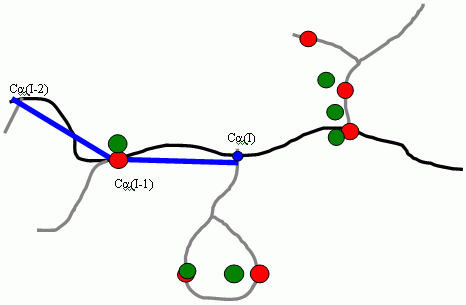
The Ca trace is extended based on the following rules:
The quality of the tool X-POWERFIT | Auto-trace Low depends on getting the right bones values (Bones Start and Bones Trim). If the values are too low, there will be too many branch points which can lead to the wrong trace. If the values are too high, there are too many break points and therefore an incomplete or fragmented trace. The method of consensus tracing involves interpreting the electron density map nine times with a different bones start parameter, then attempting to automatically identify the ideal trace. Each of the nine traces is analyzed in turn and the quality indeed (TQi) is defined for each trace as the variance along the trace atoms compared with all other traces. The best trace is defined as that with the lowest quality index and represents the trace with the lowest variance from all other traces,
| Eq. 1 |

|
Where TQi is the trace quality for trace i and yn,i,j is the separation between atom n in the trace i and the nearest atom in trace j . The index is normalized by 1/N2 to decrease the value of TQi for long trace lengths, as these are more desirable. The variance of each atom Can is defined as the sum of the distances to the nearest atoms within the eight other traces.
If the automated tracing protocols described above fails to give a satisfactory trace, you can extend the trace in a semi-automated manner using the tool X-POWERFIT | Vector -> CA trace. This tool uses directed refinement to place Ca atoms into the electron density using the vector as a starting point. You should note:
The likelihood of the element being identified correctly, and hence fitted to the electron density, can be inferred from the "error level" printed to the textport upon completion of the refinement of the Ca trace fitting.
Any structure fitted, but obviously not correct can be deleted with the tool CA Build | Delete current segment.
On fitting the secondary structure elements, Ca atoms should be deleted from the ends if they are beyond the extent of the secondary structure. Use the tool CA build | Delete current CA and append the Ca atoms to the segment with the tool X-POWERFIT | Next CA as helix-strand. Upon completion of fitting all the required observed secondary structure elements, the procedure described in the next section can be carried out to place more secondary structure. Since most proteins contain secondary structure throughout most of the molecule, any volumes in the mask not containing secondary structure should be analyzed again.
Missing strands of beta sheets can be observed sometimes after one round of automated Ca tracing. These can be added manually with the tool X-POWERFIT | Place edit strand by picking two points from the bones. Since the directed refinement has a high radius of convergence, the original placement need only be approximate, but the length may have to be extended due to a size limitation imposed by the refinement algorithm.
Structure in local regions can be fitted by moving the pointer to the center of the regions to be searched (with either the mask pointer, or rhomboid pointer), setting the map mask radius to a smaller value to cover just this region completely (from the Options... dialog), and reducing the bones start value. Use Pointer | Go to pointer to reset the display with the desire position. The search can now be carried out again to see if any more structure can be observed in this region automatically, and if so, added as Ca trace with X-POWERFIT | Vector -> CA trace.
Once the secondary structure has been found as vectors, it is possible to search the protein databank using a maximal sub structure alignment of secondary structure. The tool X-POWERFIT | Search and Browse DB allows you to run a structure motif alignment program that can, in about five to ten minutes, carry out the alignment of eight secondary structure elements against a selection of 7,000 proteins in the protein databank.
At this stage of the de-novo building process the structure direction is not known; the alignment is carried with the vector elements in both directions.
The results can be browsed as a Ca trace superimposed on the map/bones, and the Ca trace can be loaded into the tracing application and edited if it is found to be close enough to use.
It is sensible to caclulate a new set of proteins for this alignment program. The alignment program has a mode "-generate" that creates the secondary structure motig library. I also suggest that a SCOP library of non-degeenerate proteins is used this is about 6000 proteins. This will lim
Once the secondary structure has been placed, it is now possible to extend this with the tool X-POWERFIT | Auto extend CA. The extension is carried out from the current Ca atom in the current Ca trace. This can be set with the tool CA build | Current res seg. You should note:
The user should experiment with using the tool from each end of the secondary structure placed, using the pie chart in the bottom left hand corner of the display to view the progress. If some structure has been correctly built, while the end is wrong, it is possible to cut up the Ca trace with the tool CA build | Unjoin 2 CA, and rejoin them with CA build | Join 2 segments. The tool CA build | Check CA direction can also be used to indicate the quality of the build if the pie chart is not visible long enough to determine the quality graphically.
You can check for knots in the Ca trace you have generated by using the tool X-POWERFIT | Knot finder. This will take the current segment of Ca trace (select using X-POWERFIT | Current res. and seg.) and indicate in the text port whether a knot was found.
Segments of placed Ca trace can be refined with X-POWERFIT | CA refinement, particularly where secondary structure elements have been added in places where the density indicates deformation within the secondary structure. There is a limit of 250 Ca atoms in the refinement because of a limitation in the algorithm to remove the correlation along the Ca chain which is unable to handle large fragments.
Geometric restraints on Ca-Ca bond lengths and on some angles are used to maintain better geometry during the refinement.
We recommend that where reasonably high-quality maps are available, the tool that places the atoms in an "all-atom" model by real space refinement should be used (CA build | Fit seg. by RSR). Where the map quality is less good, or the resolution low, then it is recommended that you use the tool to fit the main chain by theoretical modeling and the side chains by real space refinement is used (CA build | Fit seg. by CA correlation). You should add all the sequence information to the Ca trace before building an "all-atom" model, using the sequence assignment tools provided (Sequence... palette). The building tools use the sequence information assigned to the Ca trace to automatically place the side chain atoms.