
This chapter covers methods to define torsions and other geometric properties that are used for the Conformational Search and the Analysis applications.
Conformational Search uses torsion driving as the primary mechanism for sampling the conformation space accessible to a molecule. Since torsions must be defined before a search can be performed, read this chapter first if you want to use Conformational Search in your modeling work.
When a conformation or group of conformations have been generated, torsions and other geometric properties provide useful measures for filtering and selecting subsets of structures. These tasks are performed in the Analysis application, so this chapter is also relevant as an introduction to Analysis.
Torsion driving in cyclic modeling presents some problems for maintaining closed rings during a search procedure. This chapter includes a section to describe techniques for handling cyclic structures in Conformational Search.
The chapter also describes tools for defining and applying other (non-torsion) geometric properties uses in Analysis including general distance, angle, and dihedral monitors and some specialized methods for defining distances.
For additional information on Conformational Search see Chapters 4 and 5. For additional information on Analysis, see Chapter 6.
Torsion angles are primary conformational search variables. The first step in establishing a search procedure is to define torsions in the displayed structures. During the search, these angles are varied to generate new conformations. A special palette selection, Elastic Bond, can be used to limit the effects of torsion manipulation on a molecule. In particular, this tool is used to study cyclic structures.
Each torsion is identified by a sequential number, the torsion family name, (for example, tor1) the name of the atoms composing the torsion (for example, C1, C2, C14, C15), and an indicator identifying if the torsion is a backbone or side-chain torsion.
Tools are available for defining, selecting, listing, or saving torsion angles. These tools are accessed by selecting Torsions from the Conformational Search palette that is displayed when you select Conformational Search from the Applications menu. For more information on the Conformational Search palette, see Chapters 4 and 5.
When you select Torsions from the Conformational Search palette, the Torsions palette is displayed. Table 11 lists palette selections and provides a brief description of each. When this palette is displayed, the Conformational Search palette is closed. It is automatically redisplayed when you select Exit Torsions from the Torsions palette.
|
Define All Torsions
| |
|
Use Default Names
| Automatically generates torsion names when Define All Torsions is employed. This toggle is turned off if Use Names from Template is selected. |
|
Use Names from Template
| Derives torsion names from a specified template file when Define All Torsions is employed. A prompt appears for the name of the torsion template file. This toggle is turned off if Use Default Names is selected. |
|
Define Peptide
Backbone Torsions | Automatically defines and selects all the backbone torsion angles of a peptide. This tool detects if the peptide is linear or cyclic and displays the information in the Message Line. |
|
Pick Torsions
| Allows the interactive selection of atoms to define torsion angles. |
|
Pick Torsion Sequences
| Allows the interactive selection of atoms to define torsion angles where a sequence of bonded atoms is picked and all the torsions involved in the sequence are defined. |
|
Read Torsions from File
| Reads an ASCII file (filename.tor) containing torsion angle definitions. |
|
Read Torsion
Template | Reads an ASCII file (filename.trn) containing torsion angle family definitions and defines all the torsions in the molecule belonging to the specified families. |
|
List Torsions
| Displays a list of currently defined torsions and their values for the current conformation. This list is displayed in the Textport. |
|
Save Torsions
| Saves the atoms and torsion name defining each torsion to a torsions definition file filename.tor). |
|
Save Torsion
Template | Saves the torsion family names of all defined torsions to a torsion template file (filename.trn). |
|
Select Torsions
| Selects a subset of defined torsions. The selected torsions are used as variables in a search procedure. This selection brings up a new palette used to make the torsion selection. |
|
Clear All Torsions
| |
|
Elastic Bond
| Restricts the effects of rotation about a bond to a localized region of a molecule. The connectivity of each elastic bond is broken during the torsion perturbation phase of a search procedure, but the energy term for the bond is retained. The bond's energy term closes the ring during energy minimization. See Dealing with Cyclic Structures on page 54. |
|
List Elastic Bonds
| Displays a list of defined elastic bonds for the current conformation. This list is displayed in the textport. |
|
Exit Torsions
| Closes the Torsions palette and returns to Conformational Search. |
Torsions defined in Conformational Search are used both to modify and analyze structures. Since they are used to modify conformations, they must be defined by four connected atoms. If you want to use a more general (non-driveable) dihedral angle in analysis, see the information on Geometry Monitors under Defining Other Geometric Properties in this chapter.
Define All Torsions is the selection in the Torsions palette used to define non-ring torsions in a molecular system. It provides the simplest way to define torsions about all rotatable bonds in molecules. When you use this selection, there are two ways to name torsions. If you select Use Default Names from the Torsions palette, Define All Torsions assigns default names for the torsions.
If you select Use Names from Template, the Define All Torsions function prompts for the name of an existing torsion template file. In this case, whenever a defined torsion has the same four atom names defined as a torsion family in the specified torsion template file, the family name from the file is assigned to the torsion. If such a torsion is not found in the file, a default name is assigned to that torsion.
Using Define All Torsions is the fastest way to define rotatable torsions, but it may not always be the best way. This selection defines all torsions, but, in some cases, it may be desirable to define only some of the torsions.
In addition, the specification of a torsion angle about the bond B-C requires the identification of four connected atoms, A-B-C-D. For a given bond B-C, there may be several ways of measuring the torsion value depending on the choice of the pendant (rotating) atoms A and D. When you use Use Default Names, there is no control over the choice of atoms A and D for a rotation about the bond B-C.
The Pick Torsions selection in the Torsions palette defines torsions by enabling interactive selection of four connected atoms from the viewing area. When this tool is selected, the Pick Torsions palette is displayed, providing tools that aid in defining torsions.
If torsions are already defined when Pick Torsions is selected, a dialog box is displayed. This box offers the option of adding to the existing variable torsions list or canceling all previously defined torsions and starting a new variable torsions list.
Groups of four atoms are picked interactively until all desired torsions are defined. Undo removes the most recently picked atom from the torsion definition or, after completing a four-atom sequence, Undo cancels the most recently defined torsion angle.
When four atoms are selected to define a torsion, a dialog box is displayed for entering a prefix name to assign the torsion. Assigning a meaningful name to a torsion (for example, alpha or omega) is useful for identifying the torsion at a later time.
After torsion angles are defined, select Finish in the Pick Torsions palette. Finish cannot be chosen until a four-atom sequence is selected to define a torsion. In contrast, Quit removes all torsion definitions specified during the current Pick Torsions session, then exits.
Pick Torsion Sequences is a selection similar to Pick Torsions, but it makes it possible to pick a sequence of four or more connected atoms from which a set of torsions is defined at one time. If n connected atoms are picked, n-3 torsions are defined. A dialog box with proposed torsion names is presented. For example, if a sequence of eight connected atoms, A-B-C-D-E-F-G-H, is picked, five torsions angles, A-B-C-D, B-C-D-E, C-D-E-F, D-E-F-G, E-F-G-H, are defined.
The selections Pick Torsions and Pick Torsion Sequences define only the torsion angles interactively picked. They do not define all the torsions of any given family. The selections are particularly suited to those cases where only a small number of torsion angles need to be defined.
As many as 2,000 torsions can be defined in the Conformational Search and Analysis applications. To enable easy referencing of various torsion angles, a naming convention is employed. The naming system makes it easier to deal with torsion angles belonging to various families.
Each torsion is assigned a name that consists of a user-supplied prefix name and the residue number to which the torsion belongs. The residue number is automatically appended to this prefix to generate a name of the form: name(residue_number). The prefix name can have as many as six characters.
In many molecular systems, identical or nearly identical subunits are repeated, giving rise to repetition of the same type of torsion angle. For example, in a polypeptide chain, the torsions phi, psi, and omega occur repeatedly in the backbone chain. If the prefix names chosen for these angles are phi, psi and omega, a particular torsion angle can be conveniently referred to, for example, as phi (7), psi (12), or omega (3).
All torsions of the same type have the same prefix name and are said to belong to the same torsion family. All torsions belonging to a particular family may be identified by specifying a torsion template. Torsion templates may be generated interactively or read from a torsion template file, filename.trn.
A torsion template file is an ASCII file composed of one or more records, with each record defining one torsion family. In the following example, three torsion families are defined and identified as being part of a molecular backbone:
phi	 C	 N	CA	-C	back
psi	 N	CA	 C	 N	back
omega	CA	 C	 N	CA	back
The first field in the record is a six-character field that assigns a symbolic name to the torsion family. The next four fields are six-character fields containing atom names defining the atom sequence of the torsion family. The sixth field is a four-character field designating whether the torsion belongs to the main chain or side chain of a structure This field is relevant only to polymeric systems such as proteins.
For a given torsion family name, it is acceptable to have more than one template declaration in a file. No two torsion angles may have the same family name within the same residue. Also, torsions that are part of a ring system or cyclic structure should not be assigned in a torsion template file.
A library of sample template files for some commonly occurring biopolymers is provided in QUANTA. This library can be accessed using the environment variable $QNT_TORTEMPLT. Templates are available for defining protein, polysaccharide, and DNA torsion angles. It must be emphasized that these are sample template files. For any specific molecule, the torsion angle definitions should be used with care. For instance, make sure that no two torsion angles have the same family name within the same residue. To handle specialized molecules, you are encouraged to construct your own template files.
Torsion selections employ two different kinds of ASCII files for saving and retrieving torsion angle definitions:
The following selections in the Conformational Search palette are involved in saving and retrieving torsion angle definitions:
Read Torsions from File reads an existing .tor file and defines these torsion angles. A File Librarian dialog box is displayed listing all torsion definition files in the current directory having the proper filename format. This selection checks the four atom numbers for a correctly defined torsion by employing atom connectivity information. It also checks for duplicate specifications. If two torsion definitions have the same two atom numbers in the middle, the entire torsion definition file is rejected. A message is displayed in the message line stating that the torsion definition file was ignored.
Save Torsions writes the current torsion definitions to an ASCII file. A File Librarian is displayed so that you can enter a base filename for the torsion definition file or select an existing torsion definition file. When a base filename is entered, a .tor file extension is automatically appended to it.
Read Torsion Template reads an ASCII file (filename.trn) that defines torsion angle families. A File Librarian displays a list of torsion template files in the directory $QNT_TORTEMPLT. One of these files can be selected, or the directory can be changed to select a user-defined torsion template file. After the file is read, all torsion angles belonging to the specified families are defined.
Save Torsion Template creates a torsion template file (filename.trn) corresponding to the torsions currently defined. An output template filename must be specified.
List Torsions displays a list of currently defined torsions and their values for the current conformation. This list is displayed in the Textport.
Select Torsions in the Torsions palette is used to make specific torsion subset selections. When torsions are defined, all the defined torsions are automatically selected. All selected torsions are considered to be variables in any search procedure.
The option of selecting a subset of torsion angles enhances the flexibility of search procedures. For example, the torsion template file $QNT_TORTEMPLT/protein.trn defines all torsions in a peptide or protein. After reading this template file, you can use Select Torsions to specify a torsions subset that includes only sidechain torsions of a particular residue type. This subset becomes the variable torsion list during a search procedure.
The selected torsions list is modified by selections in the Select Torsions palette that is displayed when Select Torsions is selected from the Torsions palette.Table 12 lists and briefly describes each selection.
As selections are made, structures displayed in the viewing are modified to show the selected torsions using color 2 (default blue) for selected bonds. Atom coloring is reset when you leave the Select Torsions facility.
Include and Exclude are mutually exclusive toggles. One of them is active in the Select Torsions palette at all times. Combined with Include or Exclude, All Torsions includes or excludes all the torsions from the selection list. All Backbone Torsions includes or excludes all the backbone torsion angles. All Sidechain Torsions includes or excludes all sidechain torsion angles.
Double and Peptide Torsions examines the atom types of the central two atoms in the torsion to determine if the bond between them is a double or peptide bond. If there is a bond of either type, selection includes or excludes the torsion angle. This selection is used to deal rapidly with peptide and double bonds during conformational search.
Select a Subset of Torsions allows you to make torsion selection from a dialog box listing all the defined torsions in a structure. This selection method is ideally suited for a small molecule with a few torsion angles.
Make a Custom Selection is primarily used with molecules made up of several residues such as a synthetic polymer or a biopolymer chain. Selecting this tool brings up a dialog box that permits specification of a set of torsions within a residue range, within a set of residue types, and within a set of torsion family types.
List Torsions lists the defined torsions in the textport. Those torsions belonging to the current subset selection are easily identified by the asterisk in the last column of the listing.
Four selections and options aid in searching conformations of cyclic structures. Two selections, Define Peptide Backbone Torsions and Elastic Bond, are selections in the Torsions palette. The remaining two, Initialize Go Scheraga Cyclization and Find Go Scheraga Cyclization Type, are options displayed in a dialog box when Cyclization is selected from the Conformational Search palette.
Define Peptide Backbone Torsions automatically defines and selects all backbone torsion angles of a peptide. It detects if the peptide is linear or cyclic, and displays this information in the message line. Cyclization detection is limited to cyclization through the backbone atoms. This selection is the only proper way to pick the backbone torsion angles for cyclic peptides before the Go-Scheraga cyclization method is employed.
Define Peptide Backbone Torsions temporarily opens the cyclic peptide by manipulating the atom connectivity information. It defines the backbone torsions, then resets the connectivity information. This procedure automatically makes one of the backbone torsions elastic and enables the backbone torsions to be correctly manipulated. When both sidechain and mainchain torsions are defined, the program requires selection of this tool before reading or interactively selecting sidechain torsion angles.
Elastic Bond properly defines torsion angles in cyclic structures to allow conformational search procedures to execute. Normally, if an attempt is made to rotate about a torsion defined in a ring system, the entire structure tumbles in space and the conformation remains unchanged. This problem is circumvented by making one or more bonds in the ring temporarily breakable but hiding the break from the force field. For example, if the bond C-D is made elastic in the atom sequence A-B-C-D, a rotation about bond A-B will affect atom C but leaves atoms D and E unchanged. Since C is moved and D is not, the bond C-D will be stretched relative to its equilibrium length. However, the connectivity break is hidden from the force field so it sees only a stretched bond. Subsequent energy minimization is used to restore the bond it its equilibrium length.
When you select Elastic Bond from the Torsions palette, the bond you choose flashes momentarily when it is selected. Information about the bond is printed in the Textport. Elastic Bond must be selected each time a bond is picked. When Elastic Bond is selected, existing torsion definitions are automatically cleared. Therefore, torsions must be defined after elastic bonds are designated.
If the molecule under investigation is a cyclic peptide, and Define Peptide Backbone Torsions is selected, an elastic bond is automatically defined.
In addition to torsion manipulations in cyclic molecules, Elastic Bond can be used in non-cyclic situations to confine deformations to a specific region of the molecule.
Since atom connectivity lists are used to define bonds for CHARMm energy calculations, calculate an initial energy before creating an elastic bonds.
The Initialize Go Scheraga Cyclization option sets up the Go-Scheraga cyclization procedure. Define Peptide Backbone Torsions must be used to detect a cyclic structure before the Initialize Go Scheraga Cyclization option is employed.
Initialize Go Scheraga Cyclization establishes the Go-Scheraga cyclization solution type. See citation 1 in the References section for a description of this technique. The selection is only available when Define Peptide Backbone Torsions detects a peptide as being cyclic.
The conditions for cyclization are satisfied when six dependent backbone torsion angles are suitably adjusted as other independent backbone torsion angles vary during a search procedure. The six dependent torsion angles are the last three phi-psi pairs in a peptide sequence.
If the independent torsion angles are given a specific set of values, cyclization may or may not be achieved, depending on how values for the six dependent torsion angles are found to satisfy the cyclization condition. If no solutions are found for the given independent torsion angle values, a cyclization failure is reported. In contrast, there may be multiple solutions to close the ring for the same independent torsion angle values.
The algebra used for the cyclization solution necessitate entering two-integer solution types. There are four of these types, referred to as [1,1], [1,2], [2,1], and [2,2]. The solution type is identified in the Textport.
Only torsions are modified when cyclization type is determined. Initialize Go Scheraga Cyclization does not vary bond lengths or bond angles during cyclization attempts. This tool assumes the conformation in the viewing area is cyclic.
The method of solving for a cyclization condition is iterative. There are two solution-seeking methods imbedded in the procedure: a global solution and a local solution
The global solution searches for all solutions for the six dependent angles for a given set of independent torsion angle values. The local solution starts from the values of the six dependent torsion angles of the previous cyclic structure, then varies each independent torsion angle iteratively to find the next set of values.
Go-Scheraga cyclization is especially useful whenever small changes in the independent torsion angles are made on an already perfectly cyclized structure. The local solution in most cases involves small random perturbations of torsion angles in the search procedure. In the Boltzmann Jump search procedure, failure after several local solution attempts automatically causes a global solution attempt. If successful, the cyclization type change is displayed in the textport.
Find Go Scheraga Cyclization Type reports the Go-Scheraga solution type in the Textport. This option will work only if Initialize Go Scheraga Cyclization has been used to determine the cyclization solution types.
Torsion definition must be carried out prior to conformational search because torsion driving is used to alter conformations. Other geometry properties such as interatomic distances, additional torsions, and general dihedral angle monitors can be defined either during a search or from within the Analysis application. Use of these properties is described below.
To define specific interatomic distances in a displayed structure, select Interatomic Distances from the Conformational Search palette. A dialog box opens offering distance handling options.
When you select Pick Distances from the dialog box, the Interatomic Distances palette is displayed. Table 13 lists and briefly describes palette selections. Up to 200 distances can be defined.
Use Finish to exit the palette. Confirm distance definitions by again selecting Interatomic Distances from the Conformational Search palette. From the dialog box, select List Distances. Distances are listed in the textport.
Read Distances reads a previously defined set of distances from a distance file (filename.dis) created and saved during a previous session.
Save Distances in the dialog box saves a set of defined distances to a file. The file can be read during subsequent sessions. A distance file extension is automatically appended to the base filename to generate a file named filename.dis.
You can access the CHARMm constraints facility from the Interatomic Distances dialog box by selecting Constraints Table Distances. The constraints facility provides a mechanism for defining or importing tables of distance constraints. You can extract previously defined tables and use them in your analysis. For more information on this facility, see Chapter 2.
In the Geometry palette, available at the modeling level, you can select Distance, Bond, Angle, and Dihedral Monitors to define and monitor these parameters. Defined monitors can be carried into analysis and used in the same way as other geometry measures. Dihedral Monitors allows you to define general dihedrals composed of any four atoms (connected or not).
Other properties that depend on geometry or internal coordinates are defined using Define Property in the Conformational Search palette. When you make this selection, a dialog box is displayed with the options:
Radius of Gyration
Dipole Moment
Number of Hydrogen Bonds
Fractional Free Volume
There properties can be calculated for each conformation during a search procedure. They can be analyzed using the Analysis application.
Complete the following exercise to become familiar with the procedures for defining torsion angles. This exercise uses search1.msf created in Chapter 2 of QUANTA Generating and Displaying Molecules. If you have not completed Chapter 2, do so before proceeding.
Display the File menu. Select the Open function. A File Librarian dialog box is displayed.
Select search1.msf from the scrolling list.
Select the Open button. The structure search1 is displayed in the viewing area.
2. Start Conformational Search.
Display the Applications menu. Select Conformational Search and the Conformational Search palette replaces the Modeling palette.
The Geometry palette remains displayed. The textport reports the following information about the displayed structure, search1.msf:
3. Display atom labels for all atoms name.
Display the Draw menu. Select Label Atoms.
From the pull-right menu that opens, select Selection Tools. The Label Atoms and Label Components and Utilities palettes are displayed.
From the Label Components and Utilities palette, select Atom Name, Residue ID, and Show Labels.
From the Label Atoms palette, select Include and All Atoms. A label containing the atom name is displayed for all atoms. These labels permit identification of the atoms composing the available torsions.
From the Label Atoms palette, select Finish. The Conformational Search palette is redisplayed
4. Define torsions in the displayed structure.
From the Conformational Search palette, select Torsions. The Torsions palette is displayed.
From the Torsions palette, select Define All Torsions. The command line displays:
Select List Torsions and the following torsion definitions are reported in the textport:
Actual atom names may differ, depending on the sequence in which bonds and atoms were placed when the structure was built.
From the Torsions palette, select Select Torsions. The Torsion Selection palette is displayed.
Selected torsion bonds in the displayed structure are colored blue and all other bonds are colored red.
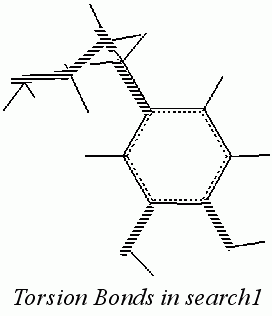
Torsion Selection: INCLUDE on 6 Torsns SLCTD out of 6.
From the Torsion Selection palette, select Include and Select a Subset of Torsions. A dialog box is displayed offering options for the selection of one torsion from all torsions currently available.
Include
and Exclude all others
4 tor4(2) C2-C14-C15-C16
Select the OK button. The dialog box is cleared from the screen. The torsion named tor4(2), comprised of the bond between the carbons that are alpha and beta to the para ring carbon, is selected. This bond remains displayed in blue and all others bonds are displayed in red.
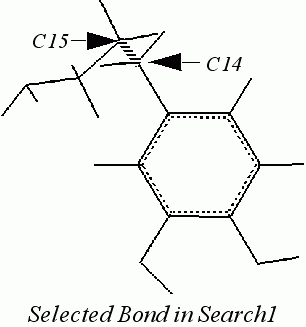
From the Torsion Selection palette, select Finish. The palette is no longer displayed. The search1 structure is redisplayed in the original colors. The message line reads:
From the Torsions palette, select Exit Torsions. The palette is removed from the screen. Defining torsions for the search procedure is completed.
Conformational Search is an application that is used to explore the conformational space of a molecular system. In a search, torsion angles are modified to generate various conformations and each conformation is processed according to criteria you define. In addition, when two or more molecules make up the system under study, spatial orientations of one molecule with respect to the other can be explored.
Torsion angles are the primary conformational search variables. The first step in establishing a search procedure is to define torsions in the displayed structures. During the search, these angles are varied to generate new conformations.
Torsions defined in Conformational Search are used both to modify and analyze structures. Since they are used to modify conformations, definition must be carried out prior to conformational search, and all torsions must be defined by four connected atoms.
Define All Torsions in the Conformational Search palette is the fastest way to define rotatable torsion. Pick Torsions is also available to define torsions by interactive selection of atoms.
Any torsions that are defined are automatically selected. All selected torsions are considered to be variables in a search procedure. You may limit selected torsions to a subset using Select Torsions to open a selection palette. The opportunity to select a subset of torsion angles enhances the flexibility of search procedures.
Tools are available for defining, selecting, listing or saving torsion angles. Up to 2000 torsions can be defined. To enable easy referencing of various torsion angles, a naming convention is employed. The naming convention makes it easier to deal with torsion angles that belong to various families.
Torsion selections employ two different kinds of ASCII files for saving and retrieving torsion angle definitions:
Four selections and options aid in searching conformations of cyclic structures: Elastic Bond and Define Peptide Backbone Torsions from the Torsions palette, and Initialize Go Scheraga Cyclization and Find Go Scheraga Cyclization Type from the Cyclization dialog box.
Elastic Bond properly defines torsion angles in cyclic structures to allow conformational search procedures to execute. One or more bonds in the ring becomes temporarily breakable. The break is hidden from the force field so only a stretched bond is seen. Subsequent energy minimization is used to restore the bond to its equilibrium length.
Define Peptide Backbone Torsions automatically defines and selects all backbone torsion angles of a peptide. It detects if the peptide is linear or cyclic. Cyclization detection is limited to cyclization through the backbone atoms. After backbone torsion angles are selected for cyclic peptides, the Go-Scheraga method is employed in conformational searching.
The Initialize Go Scheraga Cyclization option sets up the Go-Scheraga cyclization procedure. Define Peptide Backbone Torsions must be used to detect a cyclic structure before the Initialize Go Scheraga Cyclization option is employed. Initialize Go Scheraga Cyclization establishes the Go-Scheraga cyclization solution type.
In addition to torsions, other geometry properties such as interatomic distances, additional torsions, and general dihedral angle monitors can be defined either during a search or from within the Analysis application.
Interatomic Distances from the Conformational Search palette is selected to define specific interatomic distances in a displayed structure, A dialog box opens offering distance handling options. The CHARMm constraints facility can also be accessed from this dialog box.
Using the Geometry palette, you can define and monitor distance, bond, and dihedral parameters. These monitors can be carried into Analysis and used in the same way as other geometry measures. Dihedral Monitors allows you to define general dihedrals composed of any four atoms (connected or not).
Other definable properties include Radius of Gyration, Dipole Moment, Number of Hydrogen Bonds, and Fractional Free Volume. They are defined using Define Property in the Conformational Search palette. There properties can be calculated for each conformation during a search procedure. They also can be analyzed using the Analysis application.
1. Nobuhiro Go and Harold A. Scheraga. 1970. Macromolecules 3:178.